
regular expression
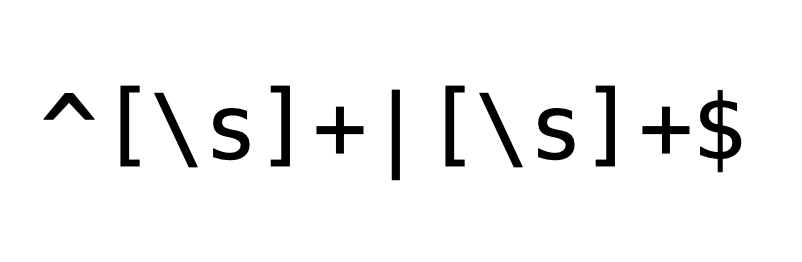
A regular expression (shortened as regex or regexp), sometimes referred to as rational expression, is a sequence of characters that specifies a match pattern in text. Usually such patterns are used by string-searching algorithms for "find" or "find and replace" operations on strings, or for input validation. Regular expression techniques are developed in theoretical computer science and formal language theory.
The concept of regular expressions began in the 1950s, when the American mathematician Stephen Cole Kleene formalized the concept of a regular language. They came into common use with Unix text-processing utilities. Different syntaxes for writing regular expressions have existed since the 1980s, one being the POSIX standard and another, widely used, being the Perl syntax.
Regular expressions are used in search engines, in search and replace dialogs of word processors and text editors, in text processing utilities such as sed and AWK, and in lexical analysis. Regular expressions are supported in many programming languages. Library implementations are often called an "engine", and many of these are available for reuse.
For Shortcuts, a good resource here and here.
Regular Expression (Regex) Syntax
A Regular Expression (or Regex) is a pattern (or filter) that describes a set of strings that matches the pattern. In other words, a regex accepts a certain set of strings and rejects the rest.
A regex consists of a sequence of characters, metacharacters (such as ., \d, \D, \s, \S, \w, \W) and operators (such as +, *, ?, |, ^). They are constructed by combining many smaller sub-expressions.
Matching a Single Character
The fundamental building blocks of a regex are patterns that match a single character. Most characters, including all letters (a-z and A-Z) and digits (0-9), match itself. For example, the regex x matches substring "x"; z matches "z"; and 9 matches "9".
Non-alphanumeric characters without special meaning in regex also matches itself. For example, = matches "="; @ matches "@".
Metacharacters ., \w, \W, \d, \D, \s, \S
A metacharacter is a symbol with a special meaning inside a regex.
The metacharacter dot (
.) matches any single character except newline\n(same as[^\n]). For example,...matches any 3 characters (including alphabets, numbers, whitespaces, but except newline);the..matches "there", "these", "the", and so on.\w(word character) matches any single letter, number or underscore (same as[a-zA-Z0-9_]). The uppercase counterpart\W(non-word-character) matches any single character that doesn't match by\w(same as[^a-zA-Z0-9_]).In regex, the uppercase metacharacter is always the inverse of the lowercase counterpart.
\d(digit) matches any single digit (same as[0-9]). The uppercase counterpart\D(non-digit) matches any single character that is not a digit (same as[^0-9]).\s(space) matches any single whitespace (same as[ \t\n\r\f], blank, tab, newline, carriage-return and form-feed). The uppercase counterpart\S(non-space) matches any single character that doesn't match by\s(same as[^ \t\n\r\f]).
Regex's Special Characters
These characters have special meaning in regex (I will discuss in detail in the later sections):
metacharacter: dot (
.)bracket list:
[ ]position anchors:
^,$occurrence indicators:
+,*,?,{ }parentheses:
( )or:
|escape and metacharacter: backslash (
\)
Escape Sequences
The characters listed above have special meanings in regex. To match these characters, we need to prepend it with a backslash (\), known as escape sequence. For examples, \+ matches "+"; \[ matches "["; and \. matches ".".
Regex also recognizes common escape sequences such as \n for newline, \t for tab, \r for carriage-return, \nnn for a up to 3-digit octal number, \xhh for a two-digit hex code, \uhhhh for a 4-digit Unicode, \uhhhhhhhh for a 8-digit Unicode.






