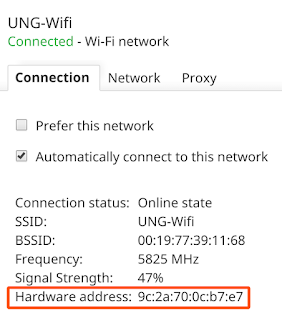
Identify Chromebook network information

sample-chromebook-macaddress.png

Find your MAC address or IP address

Some administrators restrict network access to prevent outsiders from seeing private information on the network. To use the network, you might need to give your Chromebook's MAC or IP address to your administrator. To find the MAC or IP address:

symbold-WiFi-chromebook.png
  1. If you haven't yet, sign in to your Chromebook.

  2. At the bottom right, select the time.

  3. Select the Wi-Fi network.

  4. At the top of the box, select Information .

  5. You'll see your Chromebook's IP address and IPv6 address. Your MAC address is labeled "Wi-Fi."

symbol-information-chromebook.png

Web Conferencing, Education options

education-learning-blackboard-web-conferencing-k12.jpg

Google Meet

Enable teaching, learning and working from anywhere with video capabilities that can support virtual classrooms and meetings.

…Through September 30, 2020, educators and IT administrators preparing for potential school closures can access Google Meet's premium video conferencing features such as larger meetings (up to 250 participants per call), live streaming, and meeting recording.

GoToMeeting for Education

…will provide educational institutions with free, organization-wide use of many LogMeIn products for 3 months. 

Microsoft Teams

WebEx for Schools

Plan lessons, teach your class virtually, and keep students engaged.

Zoom

Expand traditional classrooms with video communications to meet the growing needs of today’s students.

Sending Text from Windows 10 Computer

text-from-windows-computer.png

Setting up and using messages in the Your Phone app

Applies to: Your Phone appWindows 10

Setting up messages

While setting up the Your Phone app, you'll be prompted to enable access to your phone's messages, but if you choose not to at that point, you can always turn it on in the Your Phone app settings. 

To do this, open the Your Phone app, go to Settings, and under Messages, turn on the toggles for:

  • Allow this app to show text messages from my phone

  • Allow this app to send MMS attachments from my phone

  • Allow this app to receive MMS attachments from my phone

  • Automatically download MMS attachments from my phone

You can also manage your notifications and alerts for messages using the other toggles in the list:

  • Show notification banners

  • Badge on taskbar


To send a new message from your PC:

  1. On your PC, in the Your Phone app, select Messages.

  2. To start a new conversation, select New message.

Am I limited to text messages or does it work with MMS too?

The Your Phone app supports messages sent by Short Message Service (SMS). It also supports Multimedia Messaging Service (MMS) messaging. You can still send your favorite photos and your GIFs from your PC.

How many messages can I see?

To minimize network bandwidth and maximize performance, we show text messages that you've received or sent within the last 30 days.

Can I manage or delete my messages?

You can't manage or delete messages on your PC.

https://support.microsoft.com/en-us/hub/4529948/your-phone-app-help