Multiple files of form “Word Work File D_##########.tmp” on server volume.
Office 2011 “feature”.

Multiple files of form “Word Work File D_##########.tmp” on server volume.
Office 2011 “feature”.
Allow phone calls on your other devices from iPhone
You first set up your iPhone, and then set up your other devices.
On your iPhone, go to Settings > Cellular.
If your iPhone has Dual SIM, choose a line (below Cellular Plans).
Do any of the following:
Tap Calls on Other Devices, turn on Allow Calls on Other Devices, then choose the devices on which you’d like to make and receive calls.
This allows other devices where you’re signed in with the same Apple ID to make and receive calls when they’re nearby your iPhone and connected to Wi-Fi.
Tap Wi-Fi Calling, then turn on Add Wi-Fi Calling For Other Devices.
This allows other devices where you’re signed in with the same Apple ID to make and receive calls even when your iPhone isn’t nearby.
On your other devices, do the following:
On your iPad or iPod touch: Go to Settings > FaceTime, then turn on FaceTime and Calls from iPhone. If you’re asked, turn on Wi-Fi Calling.
On your Mac: Open FaceTime, choose FaceTime > Preferences > Settings, then select Calls from iPhone. If an Upgrade to Wi-Fi Calling button appears, click it, then follow the instructions.
Note: If you enable Wi-Fi Calling, emergency calls may be made over Wi-Fi, and your device’s location information may be used for emergency calls to aid response efforts, regardless of whether you enable Location Services. Some carriers may use the address you registered with the carrier when signing up for Wi-Fi Calling as your location.
International Long Distance charges do not apply when receiving international phone calls. To view rates for making international phone calls visit:http://www.verizonwireless.com/landingpages/international-long-distance-in-us/
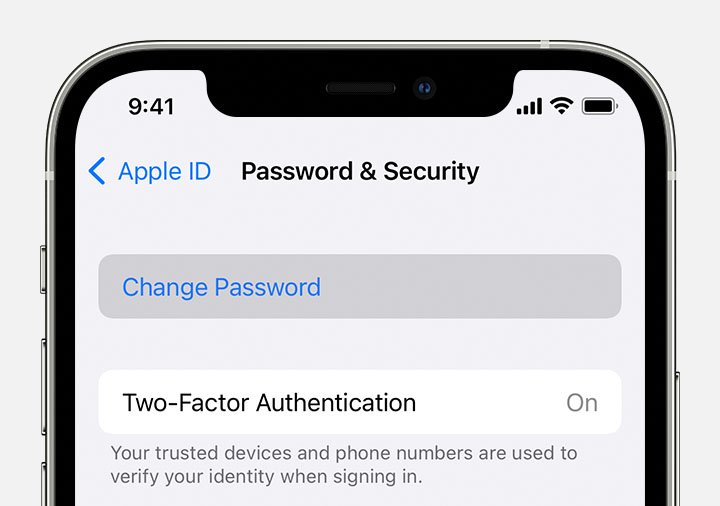
Follow these steps to change your Apple ID password.
Tap Settings > [your name] > Password & Security.
Tap Change Password.
Enter your current password or device passcode, then enter a new password and confirm the new password. Forgot your password?
Tap Change or Change Password.
Sign in with your new Apple ID password to access Apple features and services.
Learn more about how to change your Apple ID and update other account information.