
Charge your case wirelessly
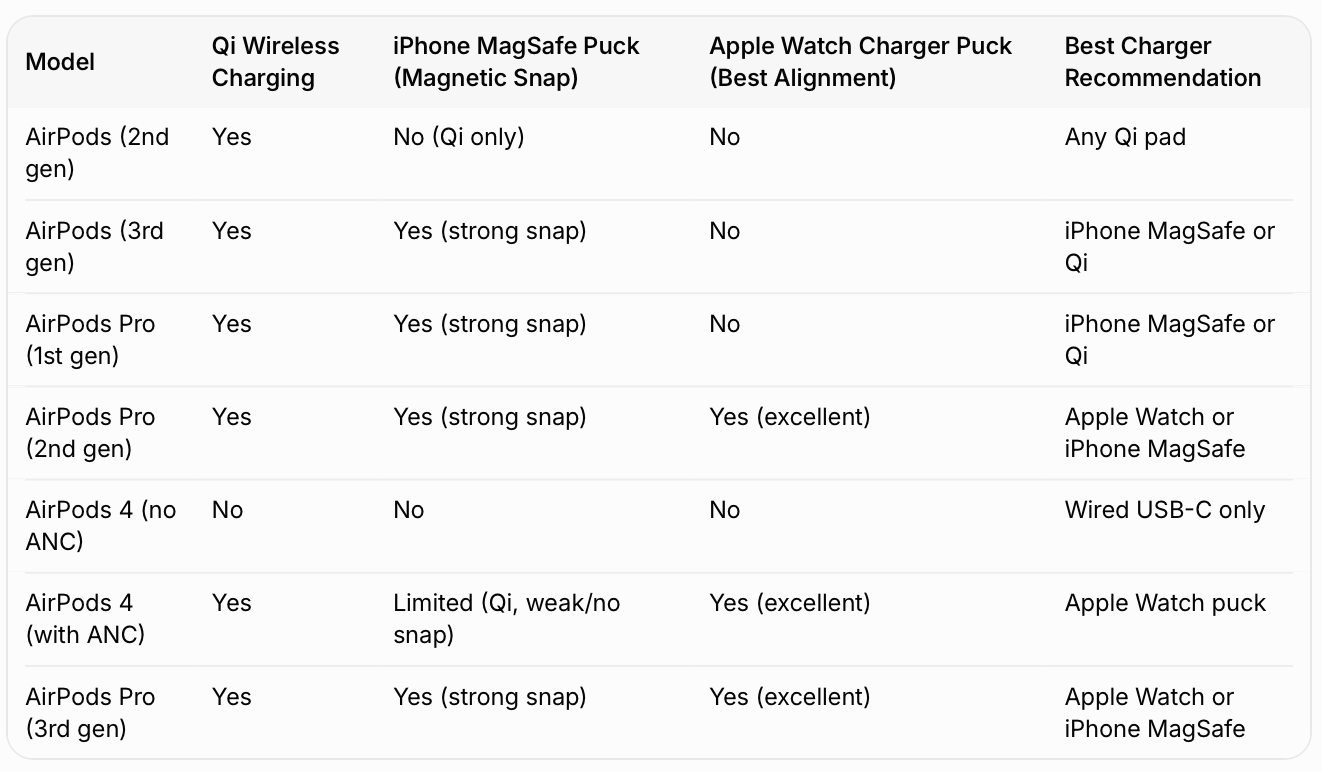
To charge your MagSafe Charging Case or Wireless Charging Case with a Qi-certified charging mat or MagSafe charger, place your case on the charger with the status light facing up and with the lid closed. The status light should show the current charge level for 8 seconds. If you have AirPods Pro 1, AirPods Pro 2, AirPods Pro 3, AirPods 3 or AirPods 4 (ANC), you can tap the case when it's on the charging mat to determine whether your AirPods are charging (amber light) or fully charged (green light).
To charge your MagSafe Charging Case (Lightning or USB-C) for AirPods Pro 2, your MagSafe Charging Case for AirPods Pro 3, or your Wireless Charging Case for AirPods 4 (ANC) with an Apple Watch charger, place your case on the charger with the status light facing up and with the lid closed. The status light should show the current charge level for 8 seconds. With the Wireless Charging Case for AirPods 4 (ANC), make sure to center the case flat on the charger.




